How React Virtual DOM works under the Hood
React Virtual DOM Explained: Diffing, Reconciliation, and Rendering

Imagine you own a beautiful house. One day, you decide to change the color of the front door from red to blue.
If you hired a traditional construction crew, they might demolish the entire house and rebuild it from scratch just to give you a blue door. This sounds ridiculous, right? Yet, for a long time, this is exactly how web browsers handled updates to the screen.
In this article, we are going to explore the core problem with standard web rendering, and how React solved it using a brilliant concept called the Virtual DOM. We will walk step-by-step through the Render, Diff, and Commit flow that makes React lightning fast.
The Problem: The Real DOM is Slow
The Real DOM (Document Object Model) is a tree-like structure that the browser creates to represent your HTML elements.
While the DOM itself is fairly quick to access, updating it is incredibly expensive. Whenever you change an element directly using vanilla JavaScript (e.g., document.getElementById('door').style.color = 'blue'), the browser has to recalculate the CSS, re-layout the page, and repaint the screen.
If you have a complex application with thousands of nodes (like a Facebook feed), and you trigger a full re-paint every time someone clicks a "Like" button, the application will freeze, lag, and provide a terrible user experience.
The Solution: The Virtual DOM
React's solution to this problem is the Virtual DOM.
The Virtual DOM is a lightweight, in-memory representation of the Real DOM. It is simply a giant JavaScript object that acts as a "blueprint" of what your UI should look like.
Real DOM: A heavy physical house. Modifying it is slow and expensive.
Virtual DOM: A lightweight blueprint of the house on a piece of paper. You can erase and redraw walls on paper millions of times per second with almost zero performance cost.
| Aspect | Real DOM | Virtual DOM |
|---|---|---|
| What it is | Actual browser API — tree of HTML nodes | Plain JavaScript object — a description of the UI |
| Where it lives | Browser memory (C++ engine) | JavaScript heap (your app's memory) |
| Cost to update | High — triggers layout, paint, reflow | Extremely low — just mutating a JS object |
| Reading/writing | Slow — crosses JS ↔ browser engine boundary | Fast — pure JS operations |
| Directly visible | Yes — what users see | No — an intermediate representation |
The React Lifecycle Step-by-Step
Let's look at exactly what happens under the hood when a user interacts with your React application. We will break this down into a mental model of four steps.
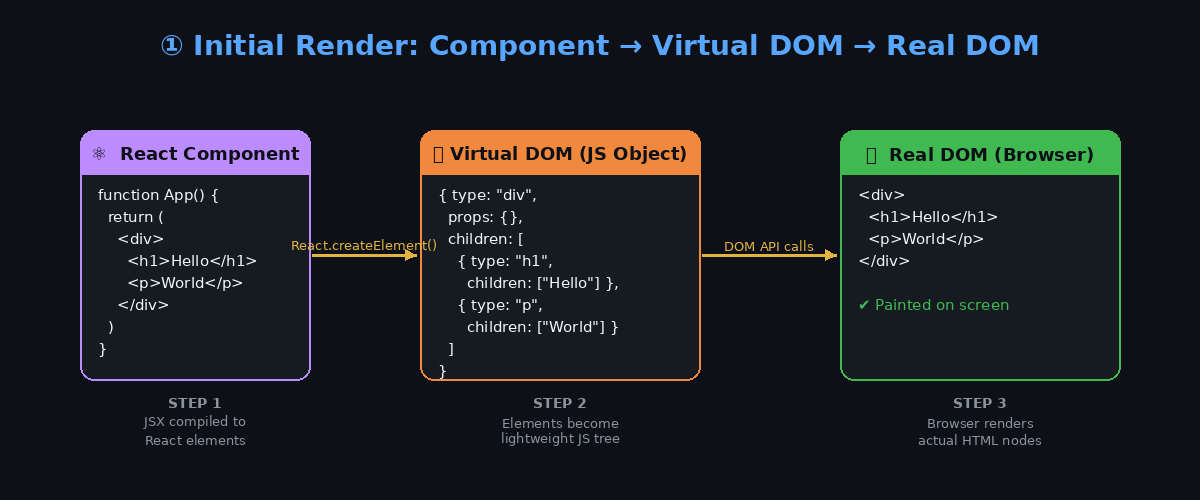
Step 1: The Initial Render
When your React application loads for the very first time, React takes your component code (JSX) and builds a Virtual DOM tree. Because the screen is currently empty, React takes this entire Virtual DOM and translates it into the Real DOM to paint the initial UI on the user's screen.
You write JSX:
function App() {
  return (
    <div>
      <h1>Hello</h1>
      <p>World</p>
    </div>
  );
}
Babel compiles JSX to React.createElement() calls:
  React.createElement("div", null,
  React.createElement("h1", null, "Hello"),
  React.createElement("p", null, "World")
)
Step 2: State or Props Change (Triggering Re-render)
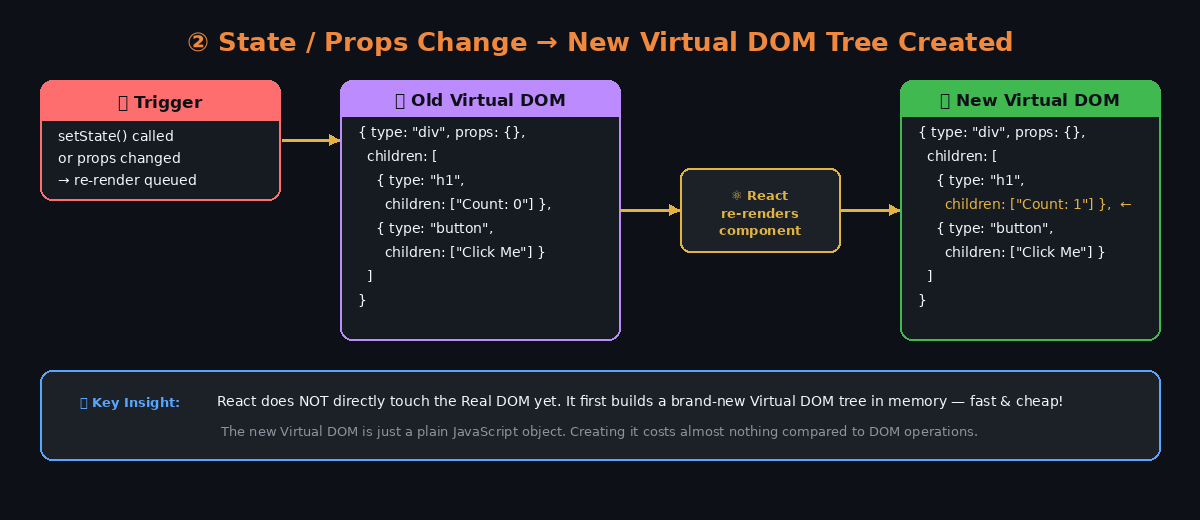
React components are reactive. When a user interacts with the app—say, by clicking a button that updates a piece of state, or when new props are passed down—React is instantly notified that the UI needs to change.
In response, React does something that sounds crazy: It creates an entirely NEW Virtual DOM tree from scratch. Why? Because creating a JavaScript object in memory is incredibly fast and cheap.
Now a user clicks a button. setState() is called. What happens?
const [count, setCount] = useState(0);

// User clicks → this fires
setCount(count + 1);
React does not immediately touch the Real DOM. Instead it:
Schedules a re-render of the component (and its children)
Runs your component function again — this is the Render Phase
Produces a brand-new Virtual DOM tree that reflects the new state
// New Virtual DOM after count = 1
{
  type: "div",
  children: [
    { type: "h1", children: ["Count: 1"] },  // ← changed!
    { type: "button", children: ["Click Me"] } // ← same
  ]
}
Step 3: Diffing (Reconciliation)
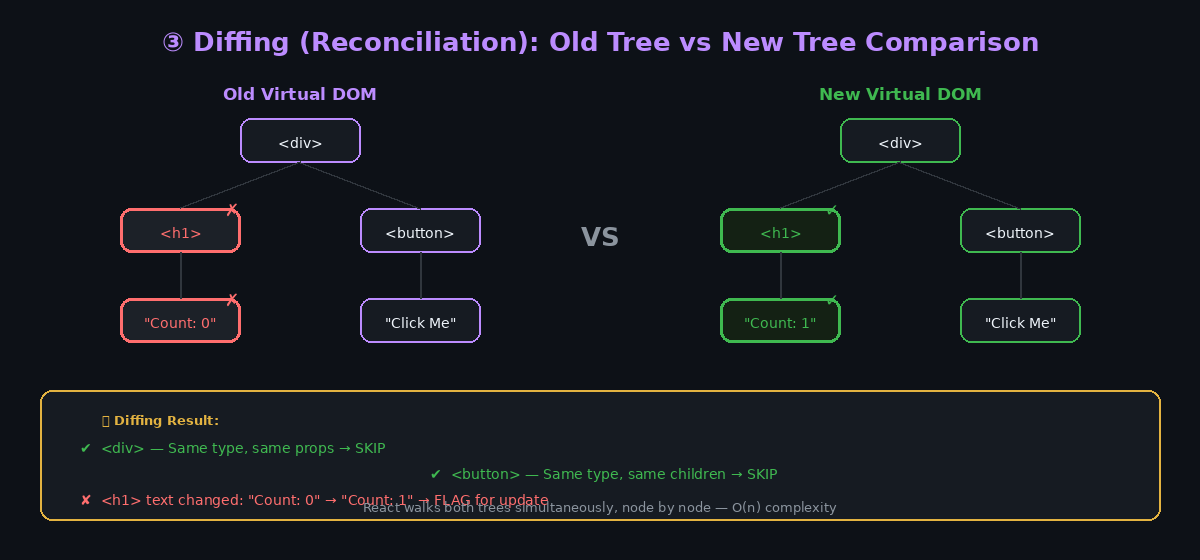
Now, React has two blueprints in memory:
The Old Virtual DOM (what the screen currently looks like).
The New Virtual DOM (what the screen should look like).
React uses a highly optimized algorithm to compare these two trees node by node. This process of comparing the old tree with the new tree is called Diffing, and the overarching process of deciding what needs to change is called Reconciliation. Instead of a slow O(n³) algorithm, React uses a heuristic O(n) approach. It figures out exactly what changed—maybe just one text node, or one CSS class.
Rule 1 — Different element types → full rebuild
// Old tree had <div>, new tree has <span>
// React tears down the old subtree and builds fresh
<div> → <span>  // Full rebuild
Rule 2 — Same type → compare props and recurse
// Same type, different prop
<h1 className="old"> → <h1 className="new">
// React updates only the className attribute
Rule 3 — Lists use key for identity
// Keys tell React which item is which across renders
<li key="a">Apple</li>
<li key="b">Banana</li>
Without key, React can't know if you moved an item or deleted one — it falls back to positional comparison, which can cause bugs and waste updates.
Reconciliation Output
After diffing, React produces an effects list — a list of changes that need to be applied:
Effects list:
✘  UPDATE  h1.textContent: "Count: 0" → "Count: 1"
✔  SKIP    div  — no changes
✔  SKIP    button  — no changes
Step 4: The Commit Phase (Updating the Real DOM)
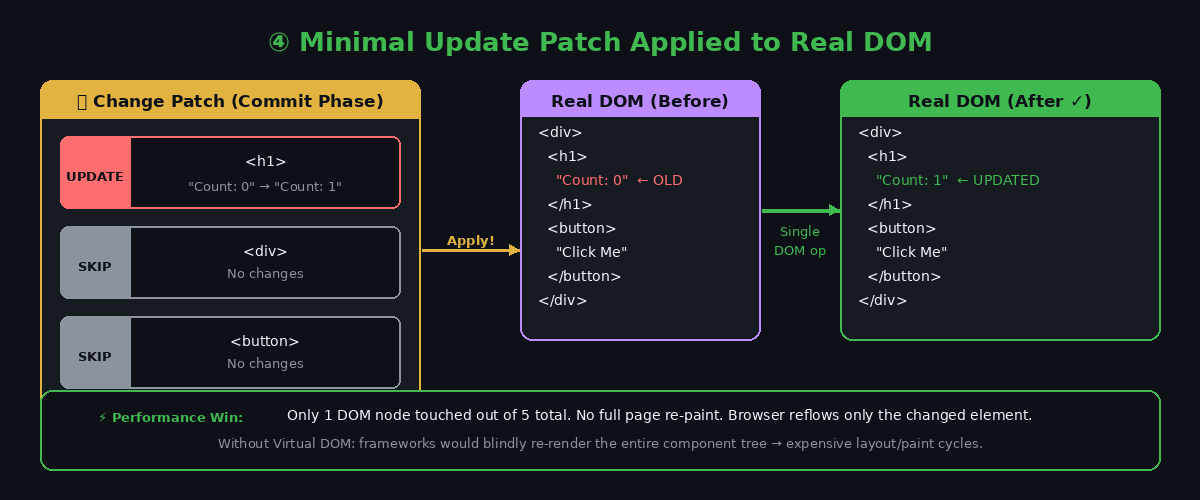
Once React knows exactly what changed (e.g., "Only the tag's text changed from 0 to 1"), it creates a patch.
React then reaches into the Real DOM and applies only that minimal required change. It doesn't rebuild the whole house; it just repaints the scratched door.
// React internally does something like:
h1Node.textContent = "Count: 1";
// That's it. One DOM operation. Nothing else.
The browser then:
Detects which nodes changed
Recalculates layout only for affected nodes (not the whole page)
Repaints only the pixels that changed
Compare this to naive re-rendering:
// Without Virtual DOM — brute force
container.innerHTML = renderEverything(); // Destroys & rebuilds ALL nodes
Diagram: The Commit Phase
Why This Approach Vastly Improves Performance
You might be wondering: Isn't creating a new Virtual DOM and comparing it extra work?
Yes, but it is JavaScript work, which is lightning fast. By doing the heavy lifting in memory, React avoids the true performance killer: browser repaints and reflows.
Furthermore, React does Batching. If you update three different state variables at the exact same time, React won't update the Real DOM three separate times. It will batch them together, do the diffing once, and update the Real DOM in one single, efficient sweep.
Here is the performance story end to end:
| Phase | What happens | Cost |
|---|---|---|
| Render | Component function runs, new VDOM created | 🟢 Very low (pure JS) |
| Diff | Old VDOM vs new VDOM compared | 🟢 Very low (O(n) JS) |
| Commit | Minimal DOM mutations applied | 🟡 Low (targeted) |
| Browser Paint | Only changed nodes repainted | 🟡 Low (minimal area) |
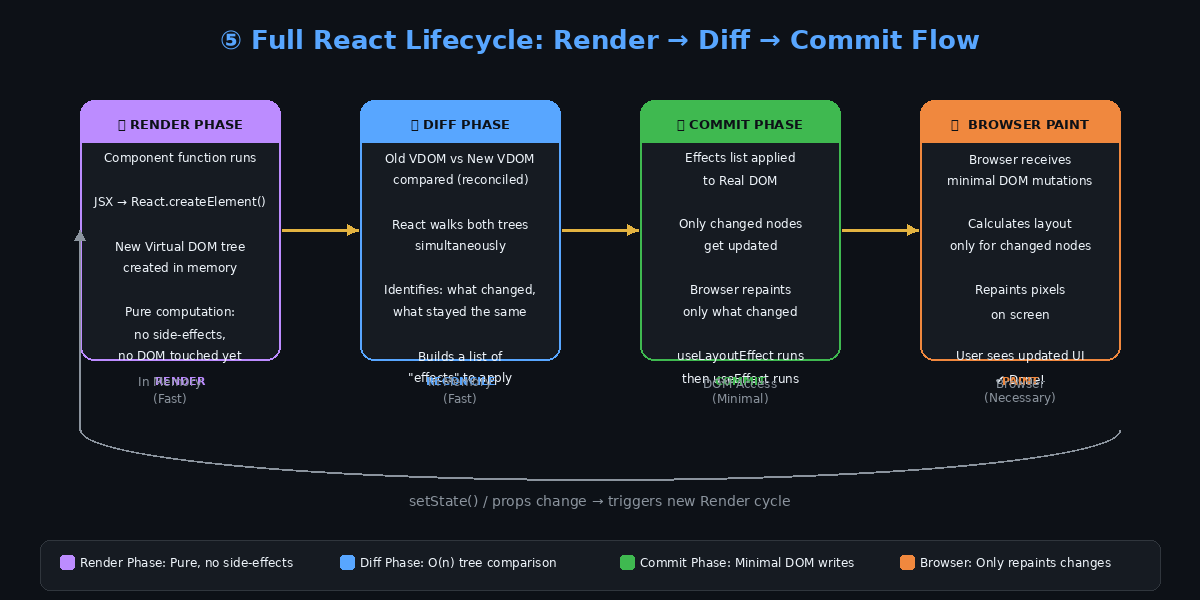
Without the Virtual DOM, every state change would either:
Require you to manually track what changed (error-prone, verbose), or
Force a full re-render of the DOM subtree (expensive)
Conclusion
The Virtual DOM is the secret sauce that made React the most popular frontend library in the world. By treating the DOM like a slow, expensive resource, and doing all the planning in a fast, lightweight memory blueprint, React allows developers to build complex, highly interactive interfaces without ever having to worry about performance bottlenecks!
Comments
Join the discussionNo comments yet. Be the first to comment.
